Part 3 – What’s In the Folder?: How to Build a Personal Operating System from Scratch using Claude Cowork
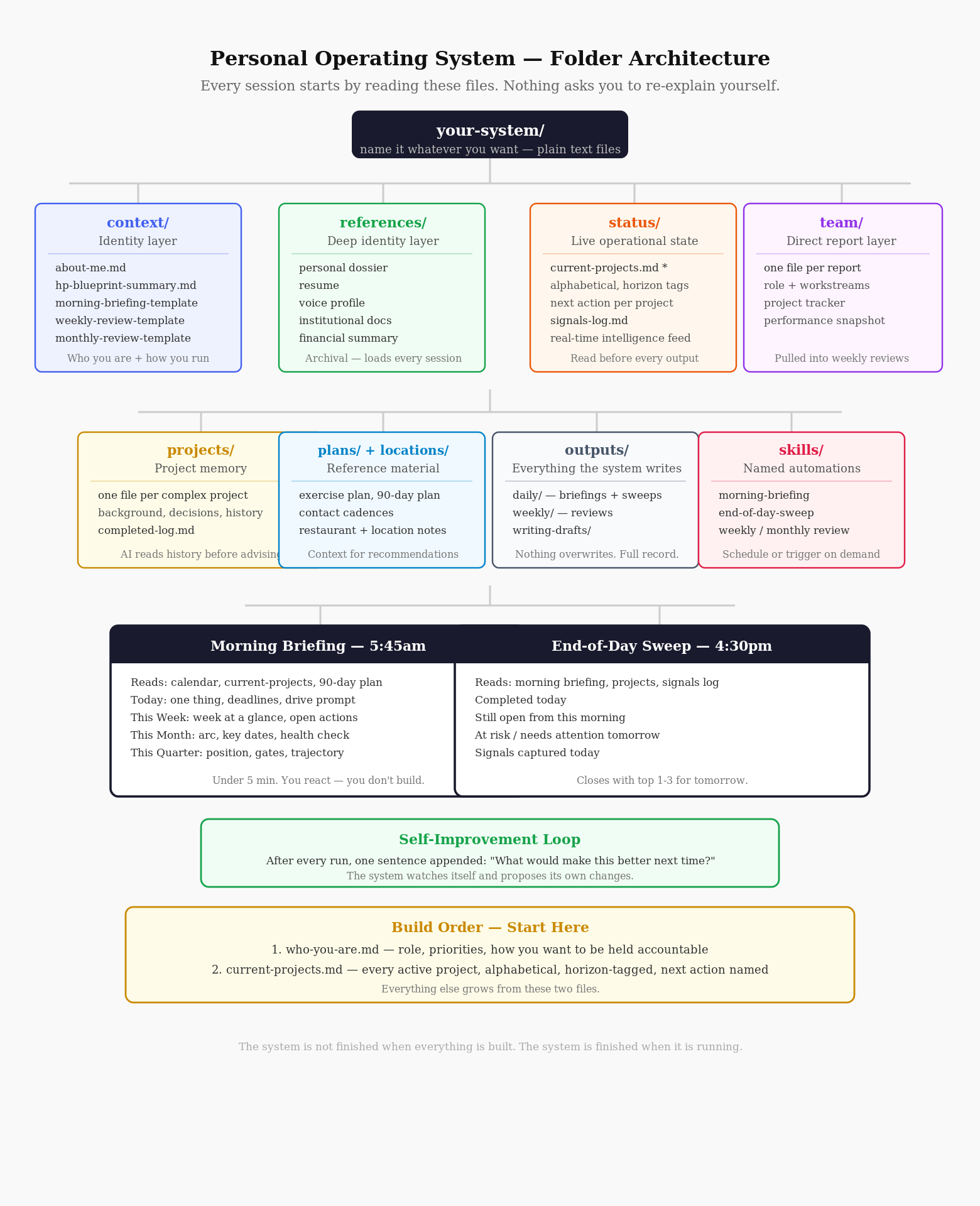
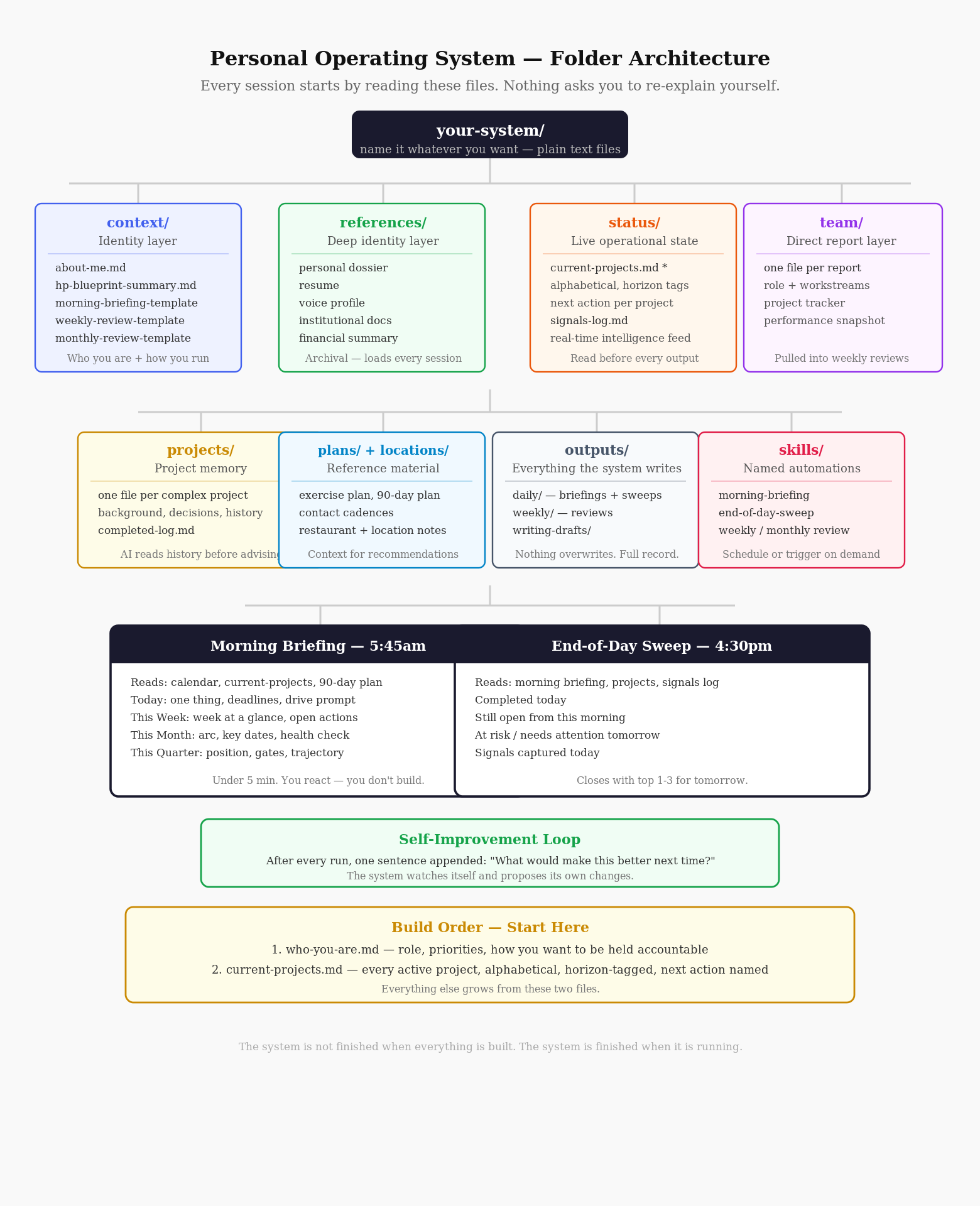
The system runs on one folder.
Insid that folder are plain text files, organized into directories. No proprietary database. No SaaS subscription that can change its pricing or deprecate a feature. The intelligence is not stored in the files. The files are context. The intelligence is in the AI that reads them before it acts.
That AI is Claude Cowork, Anthropic’s desktop tool for agentic work. What makes Cowork different from a standard chatbot is what happens before it responds. Every session begins with a context-loading step: it reads your files first. It knows who you are, what you are working on, what is due, and what has been stalled, before you type a single word. You do not re-explain yourself. You do not reconstruct the picture. It already has it.
The folder is not the system. The folder is the memory. Cowork is what makes that memory useful.
If you wanted to build a system like this, here is what you would build.
Start with two files.
Before the automations and the daily briefing and the project radar, you need two files.
The first describes who you are: your role, your current priorities, how you want to be pushed, and where you tend to need accountability. It does not need to be long. It needs to be honest. A few hundred words is enough to give the AI something real to work from.
The second file is the project radar: every active project in your professional and personal life, listed alphabetically. Alphabetical matters. It removes implied priority from the order. Priority is handled by the horizon tag each project carries: Today, This Week, This Month, This Quarter, or Parked. Every project also carries a named next action. Not a description of the project. One specific action, concrete enough to execute without re-reading the background.
Those two files are enough to start. Everything else grows from them.
The context directory holds the identity layer.
This is where you put the files that tell the system how you operate. Your daily rhythm. Your weekly non-negotiables. Your monthly cadence. These are not aspirational descriptions. They are the actual rules you want the system to enforce.
This directory also holds the templates that define what the automated outputs look like. The morning briefing template is a set of instructions: pull from these sources, calculate this, flag this, stay under five minutes. The weekly review template defines what goes in each section and what the system should surface automatically. When you update a template, every future run picks up the change. You modify the instructions once and the automation adjusts.
The references directory holds the deep identity layer.
Where the context directory is operational, the references directory is archival. This is where you keep the documents that give the AI real depth: your resume, any institutional or organizational documents you work with regularly, anything that tells the AI what you know and how you operate in the world.
If you write publicly, a voice profile belongs here. It is a documented description of how you write, what vocabulary you use, what structural moves you return to. The AI reads the profile before drafting anything in your name. What comes out sounds like you, not because of fine-tuning or model training, but because the system read the examples first.
The status directory is where the system lives day to day.
Two files carry most of the weight.
The first is the project radar. Every active project in your life, alphabetical, horizon-tagged, with one named next action. A radar is a situational awareness tool, not a queue. Its job is not to be emptied. Its job is to make sure nothing important is invisible when you need to see it.
The second is the signals log. This file exists because insight does not arrive during scheduled reflection time. It arrives in meetings. It arrives mid-conversation, when someone says something that matters and there is nowhere obvious to put it. The signals log is that place. Each entry is brief: the date, the source, what was said or observed, the type of signal, what it might be useful for. You can add to it at any point during the day. The end-of-day sweep picks it up automatically.
The team directory holds direct report portfolios.
If you manage people, one file per person. Each file contains their role, their active workstreams, a project tracker, and a performance snapshot. The weekly and monthly reviews read these files automatically. When the weekly review generates, it surfaces what moved in each portfolio, what stalled, and what requires your attention. The management layer is not a separate mental act. It runs inside the same system on the same cadence.
The projects directory holds memory for complex work.
Some projects recur annually. Some have stakeholder histories that matter. Some have decisions made in prior cycles that will surface again. For these, individual project files hold the full picture: background, key contacts, decisions made, open questions, what to do differently next time. When a project cycle closes, you append a dated entry. When it reopens, the AI reads the history before advising you on the current cycle.
There is also a completed log. When something closes without its own file, it moves here. A few lines: what it was, when it closed, what it produced. Over time this log becomes an accurate record of what you actually built, which is different from what you planned to build, which is where most performance reviews fall apart.
The plans and locations directories hold reference material.
Plans are specific, scoped documents. An exercise program. A 90-day positioning plan. A cadence for staying in contact with people who matter. They are not projects. They are frameworks the system can reference when relevant context is needed.
Locations are notes on places. A neighborhood worth exploring. A restaurant you want to return to. A park. When the system is helping you plan something, it draws on what it already knows about your options rather than working from scratch. The files are short. The value is that the information is already there.
The outputs directory is where the system writes.
Every automated output lands here, organized by type and date. Daily briefings in one subfolder, weekly reviews in another, monthly reviews in a third, writing drafts in a fourth. Nothing gets overwritten. When you sit down for the weekly review, the system has already read the week’s briefings. It knows what was flagged, what moved, what stayed stalled. The review does not start from scratch. It starts from a complete record of the week.
The skills directory defines the automations.
A skill is a named routine. The morning briefing is a skill. The weekly review is a skill. The end-of-day sweep is a skill. Each skill file defines what the automation reads, what it produces, and where it saves the output. Skills run on a schedule or on demand. If you want the morning briefing to include something it does not currently include, you update the skill file. The next run picks up the change.
The two daily anchors.
Every day runs on two automated routines.
The morning briefing generates before work starts. It pulls from your calendar across the current day, week, and month. It reads the project radar and identifies the single highest-leverage next action available. It surfaces any deadline within 72 hours, flags anything overdue, checks whether anything was published in your writing pipeline this week, and closes with one relevant development from your field. The whole thing is readable in under five minutes. You did not build your day. You are reacting to a picture that was built for you.
The end-of-day sweep runs at 4:30pm. It reads what was open this morning and compares it to what moved. It lists what was completed, what is still open, and what is at risk. It pulls any signals logged during the day. Then it asks one question: anything from today worth capturing before you close? Whatever you add goes into the signals log. The output closes with the top one to three things for tomorrow. You walk away with the next day already set up.
The system watches itself.
After every automated run, one sentence is appended to the output file: what would make this better next time? Not a summary. Not a rating. One specific improvement the system noticed in its own output.
These sentences accumulate. The system is not static. It watches itself run and proposes its own changes. You decide which ones to implement. No tool I have used does this.
Where to begin.
Start with the two files. Who you are, and what you are working on.
The morning briefing generates from those two files. The end-of-day sweep reads them. Every other layer — the references, the templates, the team portfolios, the project memory, the locations, the plans — grows from those two files as you learn what the system needs.
The system is not finished when everything is built. The system is finished when it is running.